
Trimester 2
Trimester 2 work and highlights
Trimester 2
Trimester 2
Data Types, OOP & Full Stack Projects
Game Builder & Game Engine
The biggest project of this trimester was working with a full game engine to build a multi‑level pirate game. This was where everything clicked—JavaScript fundamentals, team communication, and creative problem‑solving all came together. Working inside the game engine taught me how scenes, objects, and interaction systems connect under the hood, and gave me hands‑on experience with a real game builder workflow.
Through this project I got to communicate more with my team, coordinate on level design, and really understand how a game goes from idea to playable product. The game has 3 levels, and I built Level 1—Pirate Heist.
Play the Pirate Mega Game →Working as a Team
Building a 3‑level game isn't something one person can do alone. One of the most valuable parts of this project was learning how to work as a real team—not just splitting tasks, but actually staying in sync, communicating progress, and holding each other accountable.
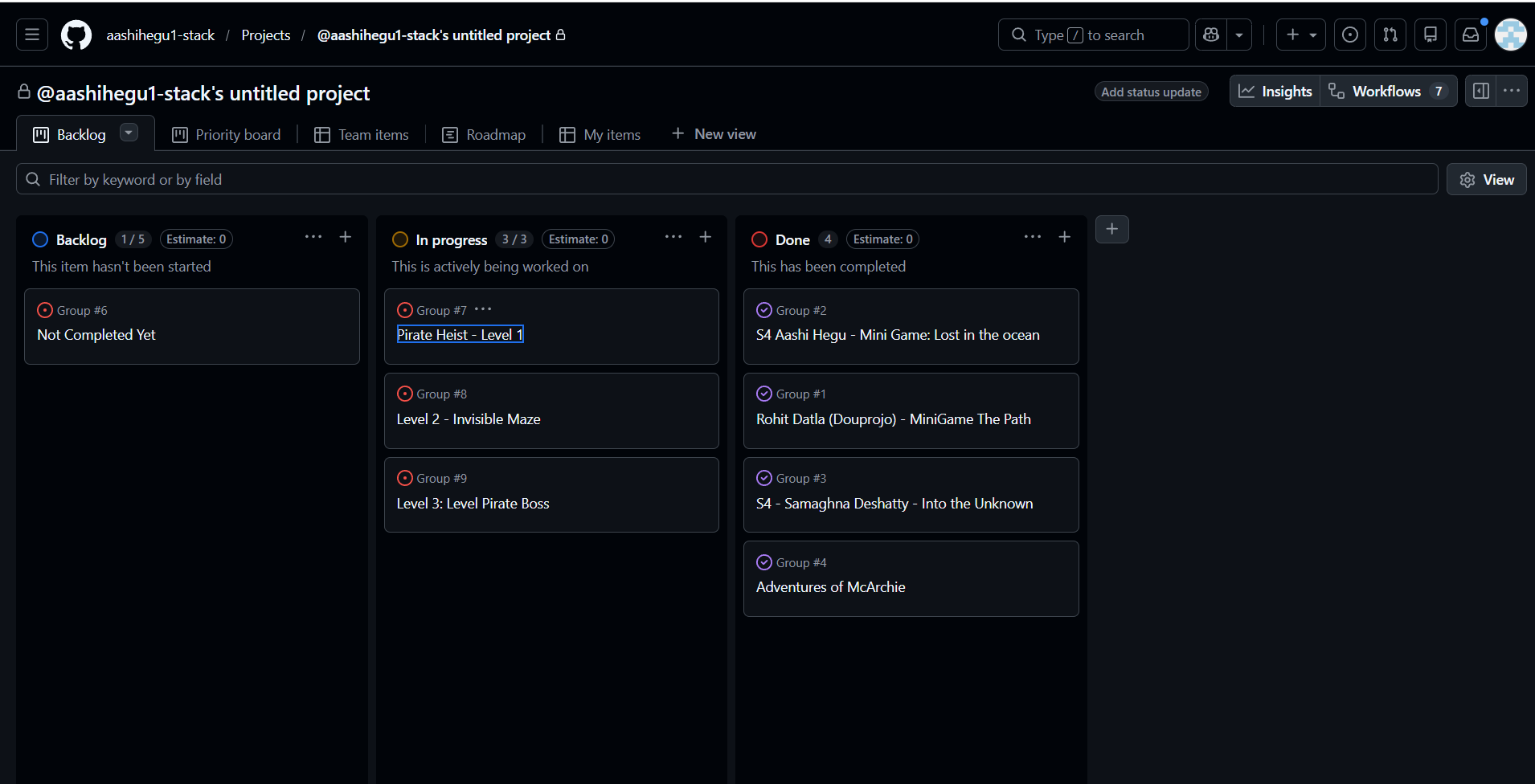
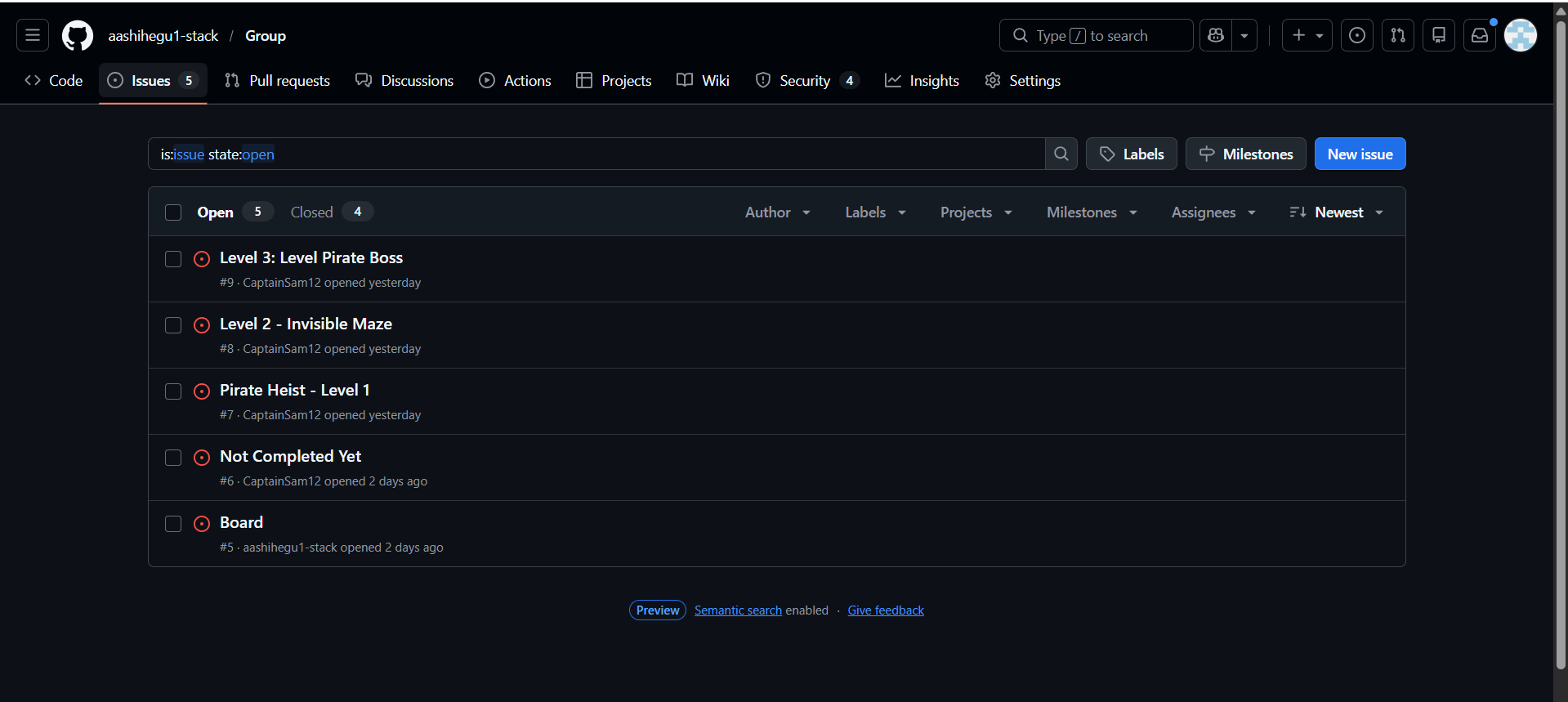
We used GitHub Issues and a project board to manage our workflow. Every feature, bug, and task was tracked as an issue, and we organized them into columns (To Do, In Progress, Done) so everyone could see at a glance what needed attention and who was working on what. This made it easy to:
- Break the project into manageable pieces and assign ownership
- Keep track of each other's progress without constant check‑ins
- Stay on schedule by seeing what was blocked or falling behind
- Document decisions and discussions directly on the issues
Using a board changed how we collaborated. Instead of vague "I'll work on it" promises, we had clear, visible commitments. It also helped when someone got stuck—teammates could jump in because they knew exactly where things stood. This experience taught me that good tooling and transparency are just as important as writing good code.
Team Board & Issues in Action
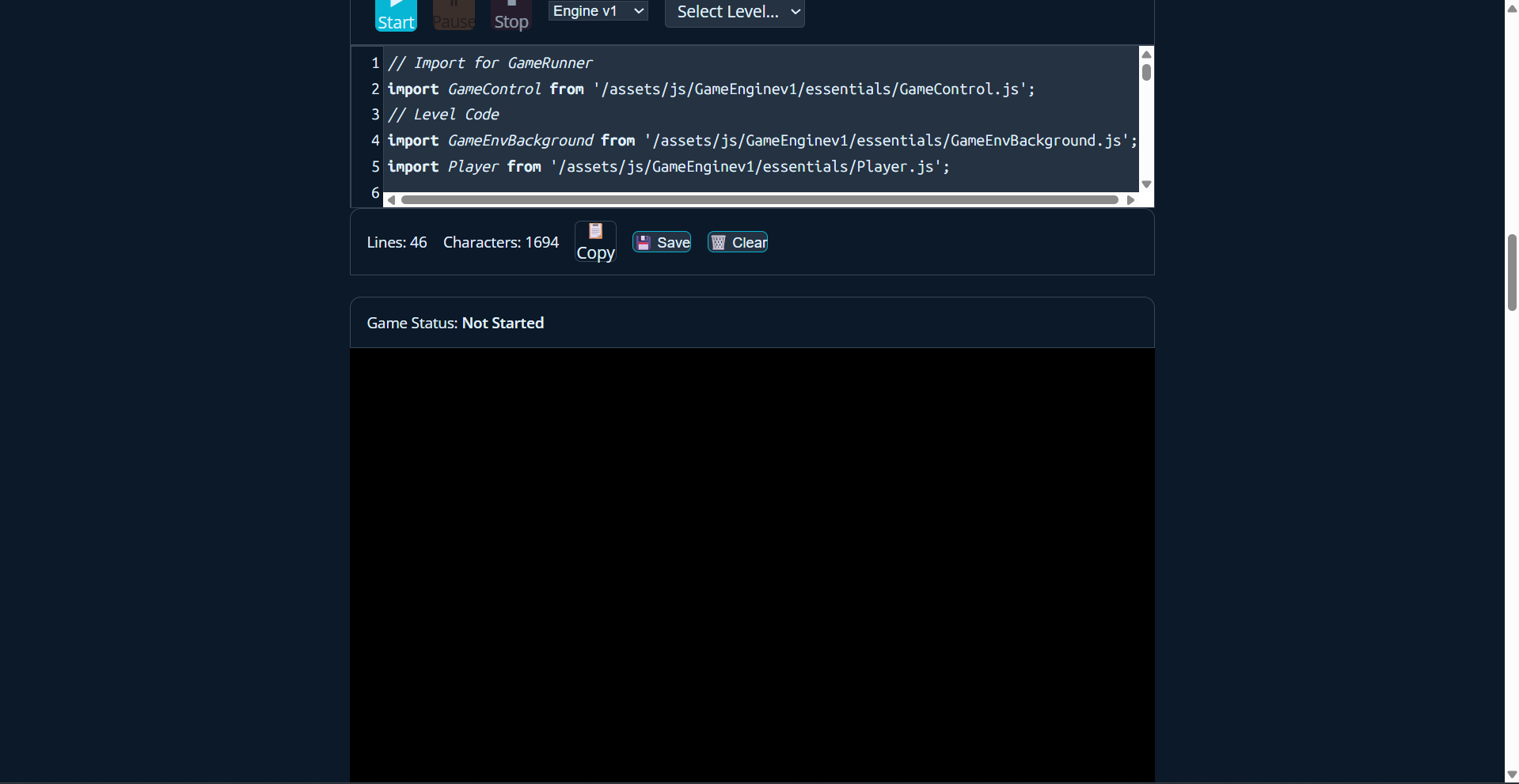
Pirate Heist – Level 1
Game Concept
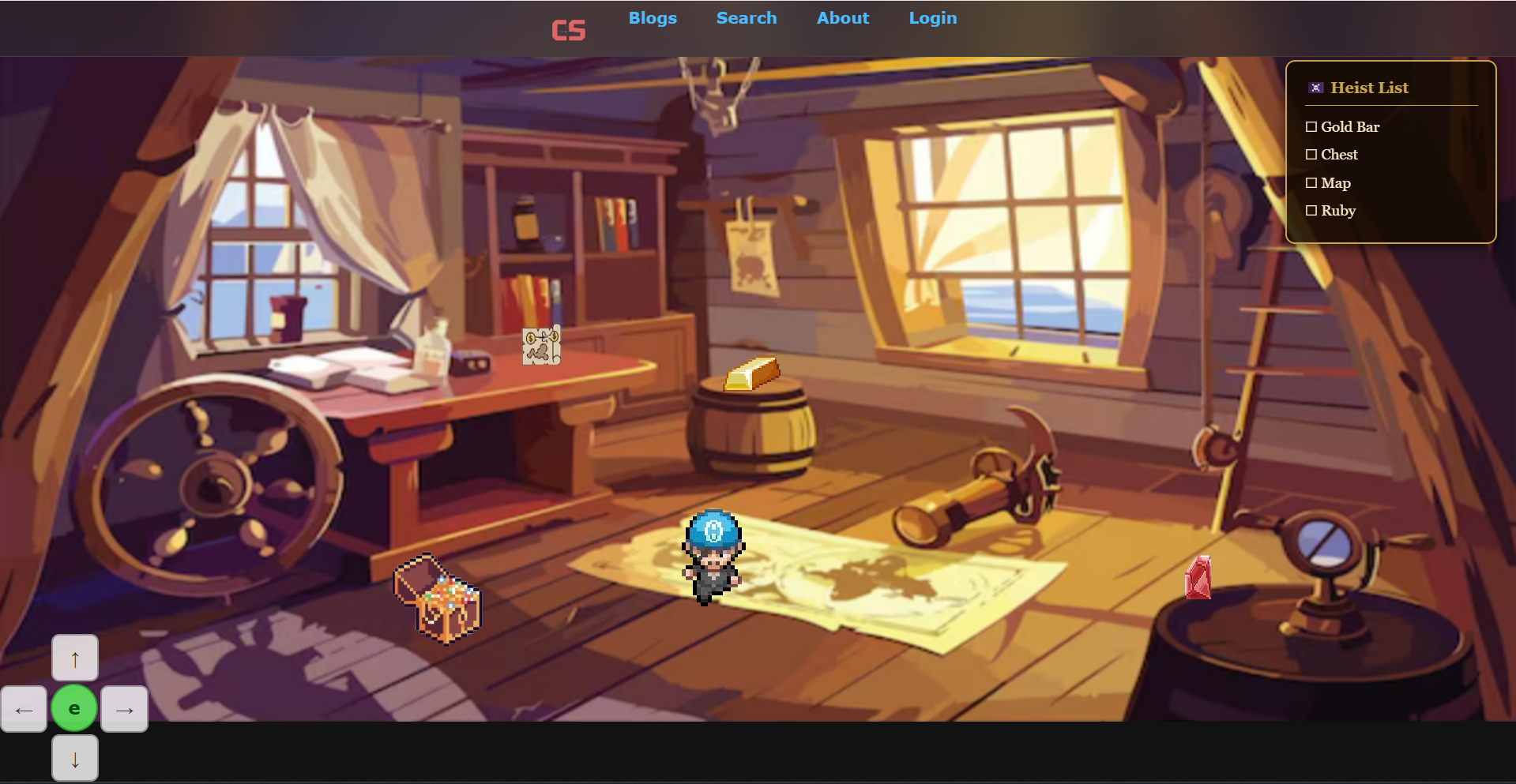
In this level, the main character McArchie sneaks into a guarded area to steal valuable treasure before anyone notices. The goal is to collect four key items:
- Chest
- Gold
- Ruby
- Treasure Map
McArchie explores the area and interacts with objects to collect these items. Once all four are stolen, the player presses Esc to progress to Level 2, where McArchie is discovered and forced into a fight. Level 1 focuses on exploration and interaction, while Level 2 introduces combat mechanics.
Objects Used
- Player with 8‑way movement
- Background environment
- Multiple NPCs with dialogue
- Collectible objects (Chest, Gold, Ruby, Treasure Map)
- Checklist UI system
Key Technical Decisions
Multiple NPC Implementation
One of the main technical improvements in this level was learning how to implement multiple NPCs instead of just one. Each NPC was given:
- A position in the game world
- Dialogue that appears when interacted with
- Interaction detection when the player presses E
Previously, I had only worked with a single NPC, so creating several required restructuring how NPC objects were created and stored in the game level. This allowed each NPC to function independently while still using the same dialogue system.
Reusing Existing Systems
Instead of rebuilding everything from scratch, I reused several systems from previous work:
- Character movement for McArchie
- Dialogue interactions for NPC conversations
- Interaction key logic for pressing E
Because these systems were already working, I could focus my time on building new features instead of debugging basic mechanics.
The Checklist System (Most Difficult Feature)
The checklist system was the hardest feature to implement. The idea was simple: the player sees a list of items to steal, and once collected, each item gets crossed off.
Example checklist at the start:
- Chest
- Gold
- Ruby
- Treasure Map
After collecting an item:
Chest- Gold
- Ruby
- Treasure Map
Even though the concept seemed simple, the coding was much more complicated. To make it work, I had to:
- Track whether each item has been collected
- Update the checklist UI dynamically
- Prevent the player from collecting the same item twice
- Connect object interaction with checklist updates
Overall, the checklist system took the most time out of everything in this level.
Object Positioning Challenges
Another surprisingly difficult part was positioning objects in the game world. Every object—NPCs, treasure items, and interactable objects—needed exact coordinates. If positioned incorrectly:
- Items could appear off screen
- NPCs could spawn inside walls or other objects
- Interaction zones wouldn't align correctly with the sprite
This required a lot of trial and error—adjusting coordinates, reloading, and testing again until everything appeared in the correct place. Although it sounds simple, it became one of the more time‑consuming parts of building the level.
Preparing for Level 2
After the player collects all four items, the checklist is fully completed, McArchie has stolen the treasure, and the story progresses to Level 2—where McArchie is caught and must fight his way out, introducing combat gameplay that builds on the exploration mechanics from Level 1.
Pirate Game – Requirements Checklist
| # | Requirement | Present? | Where |
|---|---|---|---|
| 1 | Writing Classes (Player, Boss, NPC) | Yes | Player in Player.js, BlackbreadBoss in GameLevelPirateBoss.js:7, Npc in Npc.js |
| 2 | Methods & Parameters (2 params) | Yes | checkCollision(player, cookie), checkInZone(player, zone), _overlap(ax,ay,aw,ah,bx,by,bw,bh) |
| 3 | Instantiation via GameLevel config | Yes | this.classes = [{ class: Player, data: playerData }, ...] in GameLevelPirateHunt.js:214 |
| 4 | Inheritance (3 levels) | Yes | GameObject → Character → Player / BlackbreadBoss / Npc |
| 5 | Method Overriding | Yes | update() overridden in Player, BlackbreadBoss, Npc; handleCollisionReaction() overridden in Player |
| 6 | Constructor Chaining | Yes | super(data, gameEnv) in BlackbreadBoss, Player, Npc |
| 7 | Iteration (forEach) | Yes | gameEnv.gameObjects?.forEach(...) in PirateBoss; for loops in game loop and destroy sequences |
| 8 | Conditionals | Yes | Collision type checks, state transitions throughout |
| 9 | Nested Conditions (3+ levels) | Yes | Attack + sword + range + phase checks in GameLevelPirateBoss.js:370‑407; NPC interact handler in Npc.js:100‑142 |
| 10 | Numbers | Yes | x, y, velocity, HP, scale factors, angles everywhere |
| 11 | Strings | Yes | Character IDs ('lost sailor', 'Blackbread'), sprite paths, greeting messages |
| 12 | Booleans | Yes | isPaused, wonGame, isInteracting, isOpen |
| 13 | Arrays | Yes | gameObjects[], cannonballs[], cookies[], waypoints[], this.classes[] |
| 14 | JSON Objects | Yes | playerData, bossData, npcData1‑4, bgData, cannonball objects |
| 15 | Mathematical Ops | Yes | Math.cos/sin for orbital motion, Math.sqrt for distance, Math.max/min for clamping, Math.PI for rotation |
| 16 | String Ops | Yes | Template literals for HTML/CSS, string concatenation for IDs |
| 17 | Boolean Expressions | Yes | &&, ||, ! in compound conditions throughout |
| 18 | Canvas Rendering | Yes | ctx.drawImage(), ctx.arc(), ctx.fill(), ctx.save()/restore() in Character and Boss |
| 19 | Keyboard Events | Yes | keydown/keyup listeners in Player.js, Npc interaction keys, Escape for exit |
| 20 | GameEnv Config | Yes | Object literals configure every level and game state |
| 21 | Single Responsibility | Yes | Separate methods for draw, update, collision, input handling |
| 22 | Data‑Driven Design | Yes | GameBuilder Object Literals (playerData, bossData, etc.) drive all game objects |
| 23 | State Management | Yes | Pause state, boss phases (1/2/3), wonGame, dialogue open/close, level.continue |
| 24 | SDLC | Yes | Kanban board, GitHub issues, feature branches, git history |
| 25 | Documentation (inline comments) | Yes | Inline comments on every method across all pirate level files |
| 26 | Testing | Yes | Tests exist for level 2 |
Key Skills Learned
- Implement multiple NPCs in a game scene
- Build a dynamic checklist system
- Connect object interactions with UI updates
- Reuse code from older projects
- Handle precise object placement in a game environment
Even though some features—especially the checklist and object positioning—were challenging, solving these problems helped me better understand game logic, interaction systems, and UI state management.
Code Examples
Below are line-by-line snippets from the pirate game that demonstrate a few key requirements.
#1 — Writing Classes
class BlackbreadBoss extends Character {  // define a new class that inherits from Character
    constructor(data, gameEnv) {          // constructor receives config data and game environment
        super(data, gameEnv);                // call parent constructor to set up shared properties
        this.hp = 100;                       // boss starts with 100 health points
        this.phase = 1;                      // boss starts in phase 1
    }
}
#4 — Inheritance (3 levels)
// Level 1: Base class
class GameObject { ... }

// Level 2: Character extends GameObject
class Character extends GameObject { ... }

// Level 3: Specific characters extend Character
class Player extends Character { ... }
class BlackbreadBoss extends Character { ... }
class Npc extends Character { ... }
#7 — Iteration (forEach)
// loop through every game object to check for collisions with the boss
gameEnv.gameObjects?.forEach(obj => {   // iterate over each object in the scene
    if (obj.id === 'player') {           // only care about the player object
        this.checkCollision(obj, this);    // run collision detection between player and boss
    }
});
#9 — Nested Conditions (3+ levels)
if (isAttacking) {                              // level 1: is the player attacking?
    if (hasSword) {                              // level 2: do they have a weapon?
        if (distanceToBoss < attackRange) {       // level 3: are they close enough?
            if (this.phase === 2) {              // level 4: is the boss in a vulnerable phase?
                boss.hp -= 10;                  // deal damage only if ALL conditions are met
            }
        }
    }
}
#14 — JSON Objects
const playerData = {
    id: 'McArchie',               // string — character name
    src: 'assets/pirate.png',      // string — sprite image path
    SCALE_FACTOR: 10,              // number — controls sprite size
    STEP_FACTOR: 400,              // number — controls movement speed
    ANIMATION_RATE: 50,            // number — ms between animation frames
    isPlayer: true,                 // boolean — marks this as the player object
    idle: { row: 0, columns: 1 },  // nested object — idle animation config
    walk: { row: 1, columns: 4 },  // nested object — walk animation config
};